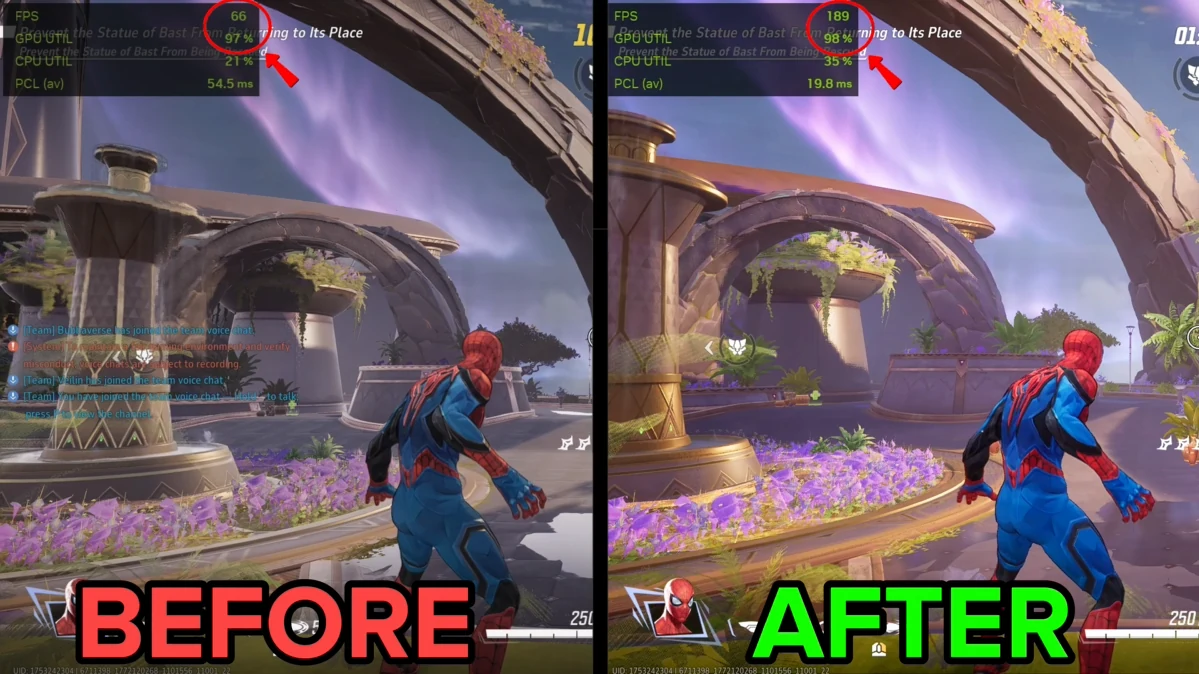
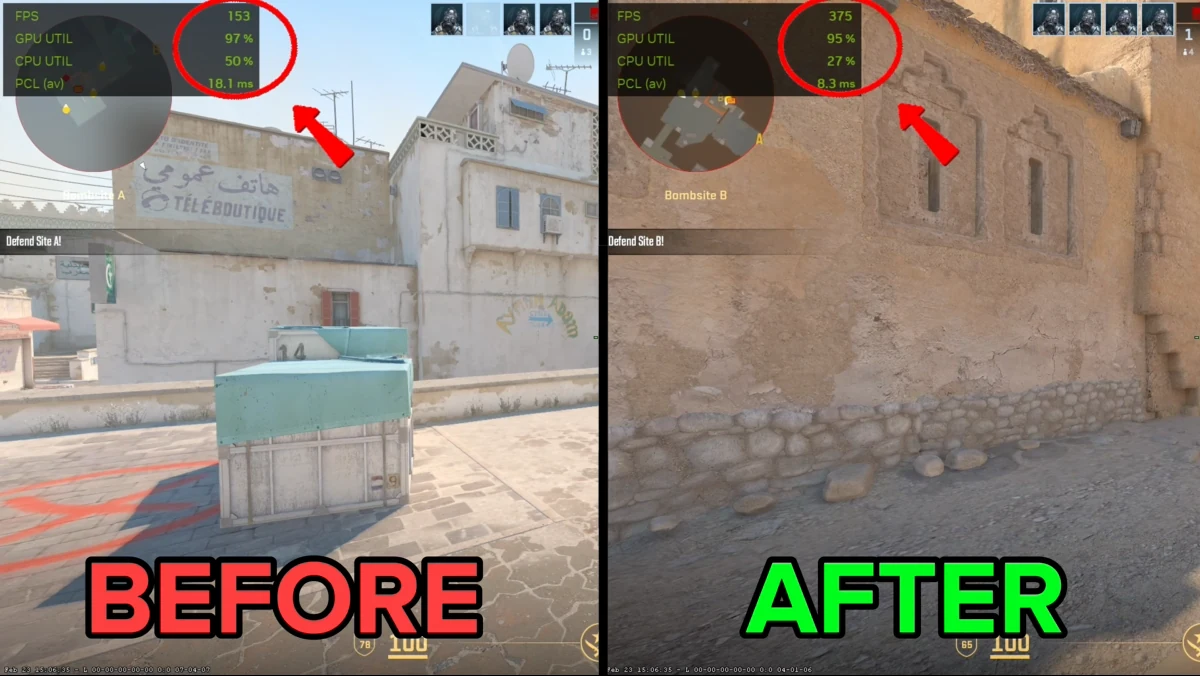
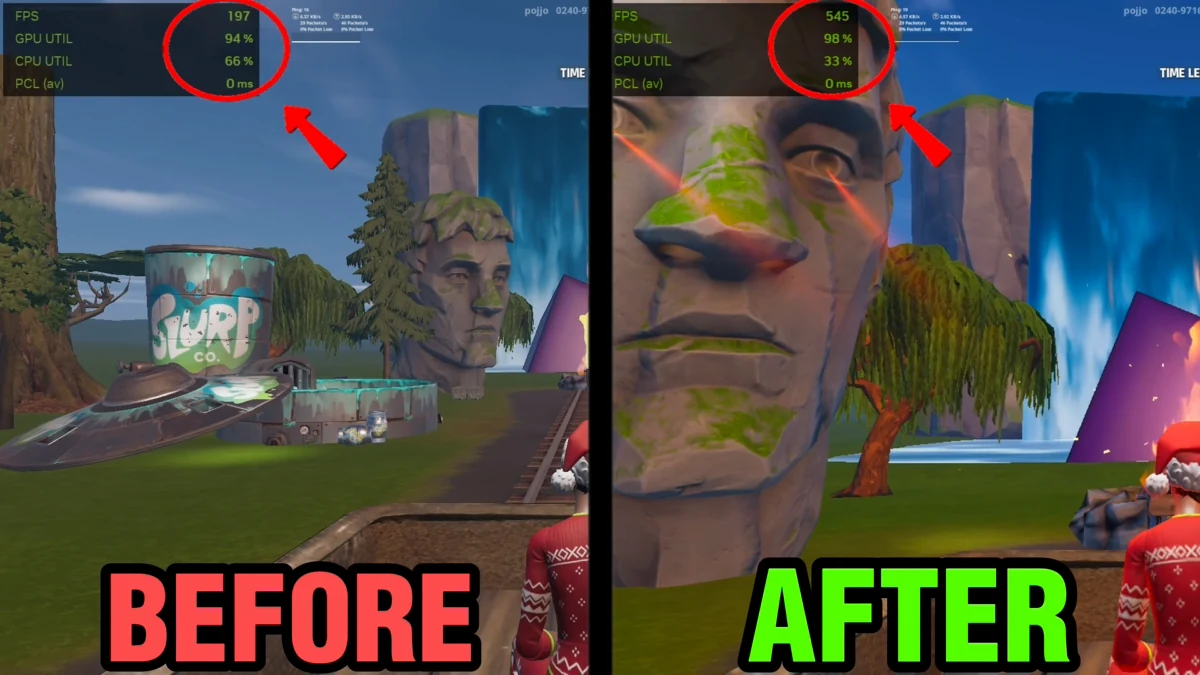
Each window is the app's real interface, running as a demo. Pick one and click around.
PC TweaksMore FPS
KBM TweaksLower input delay
Network OptimizerLower ping
CleanPCFree up RAM
Loading the demo…
PC Tweaks
Windows settings for gaming, network, debloat, privacy, power and advanced use, each one rated by risk and switched on or off on its own.
Apply Recommended turns on the low-risk set in one click
Undo any single tweak, or Restore Defaults for all of them
An assistant that reads your CPU, GPU and RAM before it suggests anything
Loading the demo…
KBM Tweaks
The Windows settings that sit between your mouse and the game: pointer acceleration, smoothing, pointer trails, keyboard repeat and the USB and driver options behind them.
Detect Applied shows what is already set on your PC
Every tweak rated low, medium or high risk before you touch it
Restore Defaults puts each setting back the way Windows shipped it
Loading the demo…
Network Optimizer
The network settings Windows leaves on defaults: DNS, TCP/IP, latency reduction, firewall and advanced adapter options, with a live ping graph on the dashboard.
Live ping to 1.1.1.1 on the dashboard while you work
Apply All Safe Tweaks and Flush DNS in one click each
Asks Windows for a restore point before its first change, plus Restore All Defaults
Loading the demo…
CleanPC
System Cleaner, Game Cleaner, Startup Manager, Storage Analyzer, Background Services and Scheduled Tasks in one place, with every item risk-labelled.
Scan first, Preview Files, then Clean Selected
Every item is off until you switch it on
Startup programs and background services listed with what they are
Windows 10 and 11 · Nvidia, AMD and Intel · Every change reversible · The windows above are demonstrations and do not touch your PC
Straight from customers
From people who bought it
Went from 180 to 460 FPS in Warzone. Genuinely didn't think software could do this. Worth every penny.
OTOliver T.Manchester · PC Tweaks
Was getting horrible frame drops in Apex. Tried everything on YouTube for months. JINSHI fixed it in 2 minutes.
JMJames M.Edinburgh · PC Tweaks
Went from Silver to Gold in Valorant within a week. The FPS consistency made the difference.
AHAdam H.Birmingham · PC Tweaks
My aim is so much more consistent now. Feels like my mouse is actually doing what I want for once.
SBSophie B.Bristol · KBM Tweaks
My keyboard response feels instant now. In Valorant I can feel every press registering immediately. Love it.
GPGrace P.Southampton · KBM Tweaks
Got the bundle and my entire setup feels upgraded. FPS through the roof and my aim is cleaner than ever. Best £40 I've spent.
CDCharlotte D.Leeds · Complete Bundle
Honestly thought this was too good to be true. It's not. My PC is transformed. Worth every penny of the bundle.
ECEmily C.Cardiff · Complete Bundle
My old i5 laptop now runs Valorant at 300+ FPS. With KBM tweaks on top I'm actually fraggin out. Unreal.
MWMia W.Stuttgart · Complete Bundle
I bought for my boyfriend as a gift. He hasn't stopped talking about it since. His FPS doubled overnight.
AFAnna F.Munich · Complete Bundle
Went from 180 to 460 FPS in Warzone. Genuinely didn't think software could do this. Worth every penny.
OTOliver T.Manchester · PC Tweaks
Was getting horrible frame drops in Apex. Tried everything on YouTube for months. JINSHI fixed it in 2 minutes.
JMJames M.Edinburgh · PC Tweaks
Went from Silver to Gold in Valorant within a week. The FPS consistency made the difference.
AHAdam H.Birmingham · PC Tweaks
My aim is so much more consistent now. Feels like my mouse is actually doing what I want for once.
SBSophie B.Bristol · KBM Tweaks
My keyboard response feels instant now. In Valorant I can feel every press registering immediately. Love it.
GPGrace P.Southampton · KBM Tweaks
Got the bundle and my entire setup feels upgraded. FPS through the roof and my aim is cleaner than ever. Best £40 I've spent.
CDCharlotte D.Leeds · Complete Bundle
Honestly thought this was too good to be true. It's not. My PC is transformed. Worth every penny of the bundle.
ECEmily C.Cardiff · Complete Bundle
My old i5 laptop now runs Valorant at 300+ FPS. With KBM tweaks on top I'm actually fraggin out. Unreal.
MWMia W.Stuttgart · Complete Bundle
I bought for my boyfriend as a gift. He hasn't stopped talking about it since. His FPS doubled overnight.
AFAnna F.Munich · Complete Bundle
My RTX 3070 was being bottlenecked by Windows garbage. JINSHI cleared it all out. 340 to 610 FPS in CS2.
TCTyler C.California · PC Tweaks
My budget PC went from unplayable to actually competitive. 67 FPS to 210 FPS in Fortnite. Insane.
JHJordan H.Florida · PC Tweaks
Clean, simple, works. No bloat, no nonsense. Just better FPS immediately after running it.
RSRiley S.New York · PC Tweaks
The input delay reduction is real. I can feel the difference in every gunfight. Headshots feel natural now.
CMCamille M.Lyon · KBM Tweaks
Tried every mouse fix on Reddit. Nothing worked like JINSHI KBM. Aim is clean, movement is smooth.
LBLeon B.Düsseldorf · KBM Tweaks
Bundle is the move. PC Tweaks alone was worth it but KBM on top is just unfair. Lobbies feel easy now.
LDLucas D.Paris · Complete Bundle
Got the bundle on a whim. Now I recommend it to every gamer I know. The combo of both tweaks is insane.
JSJonas S.Frankfurt · Complete Bundle
Went from struggling at Diamond to hitting Masters. The performance consistency from the bundle made everything click.
DWDaniel W.Newcastle · Complete Bundle
My RTX 3070 was being bottlenecked by Windows garbage. JINSHI cleared it all out. 340 to 610 FPS in CS2.
TCTyler C.California · PC Tweaks
My budget PC went from unplayable to actually competitive. 67 FPS to 210 FPS in Fortnite. Insane.
JHJordan H.Florida · PC Tweaks
Clean, simple, works. No bloat, no nonsense. Just better FPS immediately after running it.
RSRiley S.New York · PC Tweaks
The input delay reduction is real. I can feel the difference in every gunfight. Headshots feel natural now.
CMCamille M.Lyon · KBM Tweaks
Tried every mouse fix on Reddit. Nothing worked like JINSHI KBM. Aim is clean, movement is smooth.
LBLeon B.Düsseldorf · KBM Tweaks
Bundle is the move. PC Tweaks alone was worth it but KBM on top is just unfair. Lobbies feel easy now.
LDLucas D.Paris · Complete Bundle
Got the bundle on a whim. Now I recommend it to every gamer I know. The combo of both tweaks is insane.
JSJonas S.Frankfurt · Complete Bundle
Went from struggling at Diamond to hitting Masters. The performance consistency from the bundle made everything click.
DWDaniel W.Newcastle · Complete Bundle
One click and my whole PC felt different. Smoother, faster, no stutters. Should be illegal how easy this was.
LSLukas S.Berlin · PC Tweaks
Stuttering completely gone, FPS doubled. My teammates thought I got a new PC.
FMFelix M.Hamburg · PC Tweaks
My 1060 runs like a completely different card now. 120 stable FPS where I was getting 60 before.
HBHugo B.Marseille · PC Tweaks
Was skeptical about mouse tweaks but this is legit. Zero acceleration, perfect 1:1 tracking. Game changer.
CWCameron W.Illinois · KBM Tweaks
The difference in flicking accuracy is night and day. Finally hitting those shots I was always just missing.
ACAlex C.Toronto · KBM Tweaks
230 to 580 FPS in CS2 and my mouse feels like a completely different peripheral. Bundle is a no brainer.
MFMorgan F.Georgia · Complete Bundle
Was going to buy just PC Tweaks but went for the bundle. So glad I did. Everything about my setup feels sharper.
TRTaylor R.Ohio · Complete Bundle
Simple to install, instant results, reversible if needed. JINSHI is the real deal. Bundle is the best value in gaming.
QWQuinn W.Winnipeg · Complete Bundle
One click and my whole PC felt different. Smoother, faster, no stutters. Should be illegal how easy this was.
LSLukas S.Berlin · PC Tweaks
Stuttering completely gone, FPS doubled. My teammates thought I got a new PC.
FMFelix M.Hamburg · PC Tweaks
My 1060 runs like a completely different card now. 120 stable FPS where I was getting 60 before.
HBHugo B.Marseille · PC Tweaks
Was skeptical about mouse tweaks but this is legit. Zero acceleration, perfect 1:1 tracking. Game changer.
CWCameron W.Illinois · KBM Tweaks
The difference in flicking accuracy is night and day. Finally hitting those shots I was always just missing.
ACAlex C.Toronto · KBM Tweaks
230 to 580 FPS in CS2 and my mouse feels like a completely different peripheral. Bundle is a no brainer.
MFMorgan F.Georgia · Complete Bundle
Was going to buy just PC Tweaks but went for the bundle. So glad I did. Everything about my setup feels sharper.
TRTaylor R.Ohio · Complete Bundle
Simple to install, instant results, reversible if needed. JINSHI is the real deal. Bundle is the best value in gaming.
Everything your PC needs to feel faster, cleaner, and more consistent — without risky manual tweaking.
122 pro tweaks
Registry, service, power, latency, and gaming-focused optimizations curated for competitive players.
RegistryServicesPowerLatencyOne-click
Game Mode PriorityReady
Latency ProfileOptimized
Power PlanApplied
Lower ping
Network tuning designed to stabilize latency and reduce packet loss in online games.
One-click undo
Every change records the original value first, so you can test optimizations and undo any one of them.
Original values saved
AI setup assistant
Smart recommendations based on your hardware and gaming setup.
Max performance
Reduce unnecessary background load so more resources go toward your game.
Yours forever
One payment, no renewals. Every update and new feature included for life.
GOT QUESTIONS
Everything you need to know
The most common questions before buying — answered honestly.
JINSHI Tweaks only changes Windows system settings — registry values, service start types, power plans and network configuration. It does not touch game files, does not read game or system memory, does not inject code into any game process, and installs no driver. Anti-cheat systems watch the game process and its memory, and nothing here goes near either. We can't speak for any anti-cheat vendor's policy and won't guarantee an outcome on their behalf, but the reason the risk is low is a concrete one rather than a slogan.
Every tweak can be undone individually with one click, and Restore Defaults reverts them all at once to Windows defaults.
JINSHI Tweaks runs on Windows 10 and Windows 11, on laptops and desktops. The tweaks are Windows system settings rather than per-game patches or hardware-specific code, so they do not depend on which games you play or which CPU and GPU you have.
You get instant access. After checkout you receive a license key via email. Download the app, enter your key, and you're optimised in minutes. Your licence is yours to keep — one payment, no renewals, no expiry.
Most users notice the difference immediately — faster response, smoother gameplay, lower ping. Results vary depending on your hardware and how optimised your PC already is, but the tweaks are specifically designed to remove Windows bottlenecks that hold back gaming performance on most default setups.
We back every purchase with our 100% Refund Guarantee: if the app won't load on your PC, or your licence key is still unused, we'll refund you in full. Support is handled directly by the developer, usually within 24 hours.
THE COMPLETE PACKAGE
Everything you need to win.
Max FPS. Lower input delay. Lower ping. One bundle, one payment.